Product feeds
One catalog, several stores, one feed link per store
Convinci team. Published 2026-10-08, updated 2026-10-13.

A Convinci account can run more than one store on Pro and Ultimate. Each store you add gets its own feed link, built from that store's own products. There is no single link that covers every store.
Why there is one link per store
Each store has its own Shopify catalog and usually its own Meta catalog in Commerce Manager. A feed link carries the products of exactly one store.
Pointing a second store's Meta catalog at the first store's link would show the wrong products there, not merge the two. Meta would simply try to match the first store's product ids against the second store's catalog, and most of them would not match at all.
Picking a store on your account page switches which store's cards you see. Switching store never changes the link. Each store keeps its own link, permanently, for as long as the store stays on your account.

Setting up more than one store
- Add the second store from your account page.
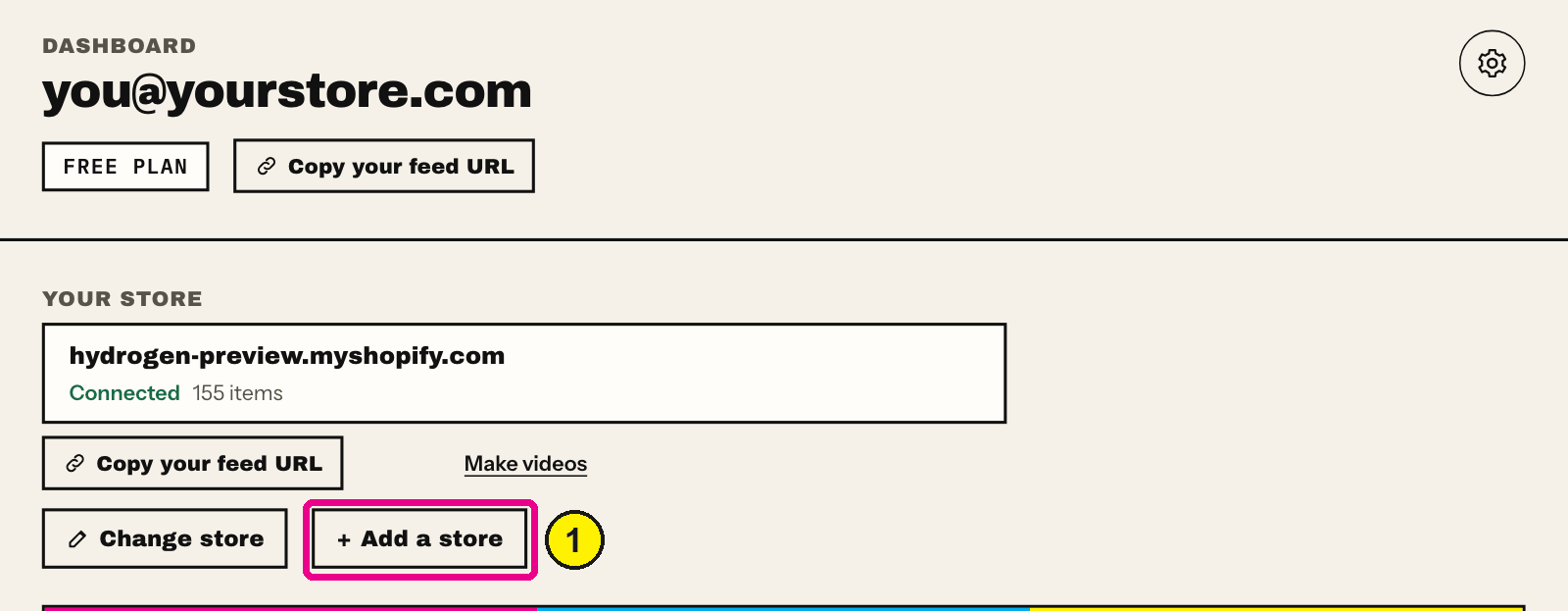
Convinci account page, Your store. Screens as of Oct 2026. - Open that store, and copy its own feed link.
- In Commerce Manager, open that store's catalog, then Data sources.
- Add that store's link as a supplementary feed, the usual steps.
- Set data source priority inside that store's own catalog too.

Priority and the automatic update toggle are both set per catalog. Doing it once for one store does not carry over to a second store. You have to repeat the priority step and the automatic update toggle inside each store's own catalog.
A worked example
Say your account runs a shoe store and a home decor store. Each has its own Shopify admin, its own Facebook and Instagram sales channel, and its own Meta catalog in Commerce Manager. Convinci gives the shoe store one feed link, and the home decor store a second, different link.
You add the shoe store's link to the shoe store's catalog in Commerce Manager. You add the home decor store's link to that store's own, separate catalog. Neither link ever needs to touch the other store's catalog.
What to double check
The easiest mistake with two stores is adding the right link to the wrong catalog. Before saving a data source, confirm the catalog name in Commerce Manager matches the store whose link you just copied. Commerce Manager shows the catalog's name near the top of the Data sources page. A quick glance before you press Save catches most mix ups.
Removing a store
If you remove a store from your Convinci account, its feed link stops updating. The data source you added in that store's Meta catalog does not disappear on its own. Delete it from Commerce Manager if you no longer want Meta reading it, or Meta keeps the last values it fetched until you do.
Naming your stores clearly
If your two stores have similar names, label them clearly inside Commerce Manager too, not just inside Convinci. A catalog named after the store it belongs to is the fastest way to catch a mismatch. You want to catch it before you save a data source, not after a support message.
Questions
- Can one feed link cover two stores?
- No. A feed link is built from one store's products. Each store needs its own link in its own catalog.
- Does a second store cost extra?
- Yes, on Pro and Ultimate. Your plan comes with one store. Each extra store is an add-on from your plan page.
- Does switching stores change my link?
- No. Switching which store you view changes what you see. Each store's feed link stays fixed and separate.
- Do my settings carry over between stores?
- No. Data source priority and the automatic update toggle are set per Meta catalog. Set them in each one.
- What happens if I remove a store?
- Its feed link stops updating. The data source in that store's Meta catalog stays until you delete it there yourself.
- Can two stores share one Meta catalog?
- Only if you set that up yourself in Commerce Manager, outside Convinci. Most stores run one catalog per store, which matches how Convinci gives out links.
See these badges on your own products before you pay anything.
Try the free previewFree for 10 products. See pricing.
 Your store
 Your card