Catalog ads
Does changing catalog ad (DPA) images reset the learning phase?
Convinci team. Published 2026-09-26, updated 2026-10-12.
Edit in Ads Manager
Starts over
Update through your Convinci feed
Stays live. Keep testing.
Changing the images in your catalog feed does not edit the ad. Meta lists any change to ad creative as a significant edit. It does not list catalog item updates. So your ad sets stay as they are. Meta also does not promise the change has no effect at all.
That is the short version. Here is where it comes from, and what does restart learning in a catalog campaign.
The short answer
A catalog ad (also called a dynamic product ad, or DPA) holds a template. The pictures come from your catalog. When you change the picture on a catalog item, you change the catalog, not the ad.
Meta's list of edits that restart learning is about the ad set and the ad. Catalog item updates are not on it. Meta does not say they never count, either. So the fair claim is this: the ad is not edited, and the change is not on Meta's list.
What Meta counts as a significant edit
Meta's significant edits page says: "Only a significant edit causes an ad set to reenter the learning phase."
It lists these as significant:
- "Any change to targeting"
- "Any change to ad creative"
- "Any change to optimization event"
- "Adding a new ad to your ad set"
- "Pausing your ad set for 7 days or longer"
- "Changing bid strategy"
Some edits may count, based on how big they are. These are the spending limit, the bid or cost goal, and the budget. Meta's example: a budget change from $100 to $101 isn't likely to count, but $100 to $1000 may.
Catalog item updates are not on the list.
Why a catalog ad is different
A normal ad holds its own image. If you swap that image, you edit the ad creative. That is on Meta's list.
A catalog ad works another way. Meta's Advantage+ catalog ads page explains it. These ads "look like other single image, carousel or collection ads," Meta says. But "the products shown are dynamically displayed for each person." The products come from your catalog.
So the ad holds the setup: the catalog, the product set, the text, and any frame, overlay or template. The pictures come from the catalog items. Change a picture in the feed and the ad itself stays the same.
This is how Convinci works. It sends designed images to Meta through a supplementary feed that swaps only the image links. Campaigns, ad sets, ads and product sets are not touched.
What does restart learning in a catalog campaign
These are edits to the ad or ad set, so they fit Meta's list:
- Editing the ad creative in Ads Manager. That covers a new frame, overlay, image template or text.
- Changing the product set or catalog on the ad set.
- Adding a new ad to the ad set.
- A big budget move, like $100 to $1000.
- Pausing the ad set for 7 days or longer.
Note the frame line. Meta says frames "will no longer be available after October 30, 2026." Moving off a frame means editing the ad. See Meta catalog ad frames ending.
Choosing or switching an image template is also done on the ad. Read Convinci vs Meta's catalog ad editor for how the two compare.
How to change images the safe way
- Use a supplementary feed for the new images, so the store's own feed and the ad stay as they are.
- Give each new image a new URL. Meta's product image page says "the new image must have a different URL."
- Set the feed schedule to Hourly, so Meta fetches it at most once an hour.
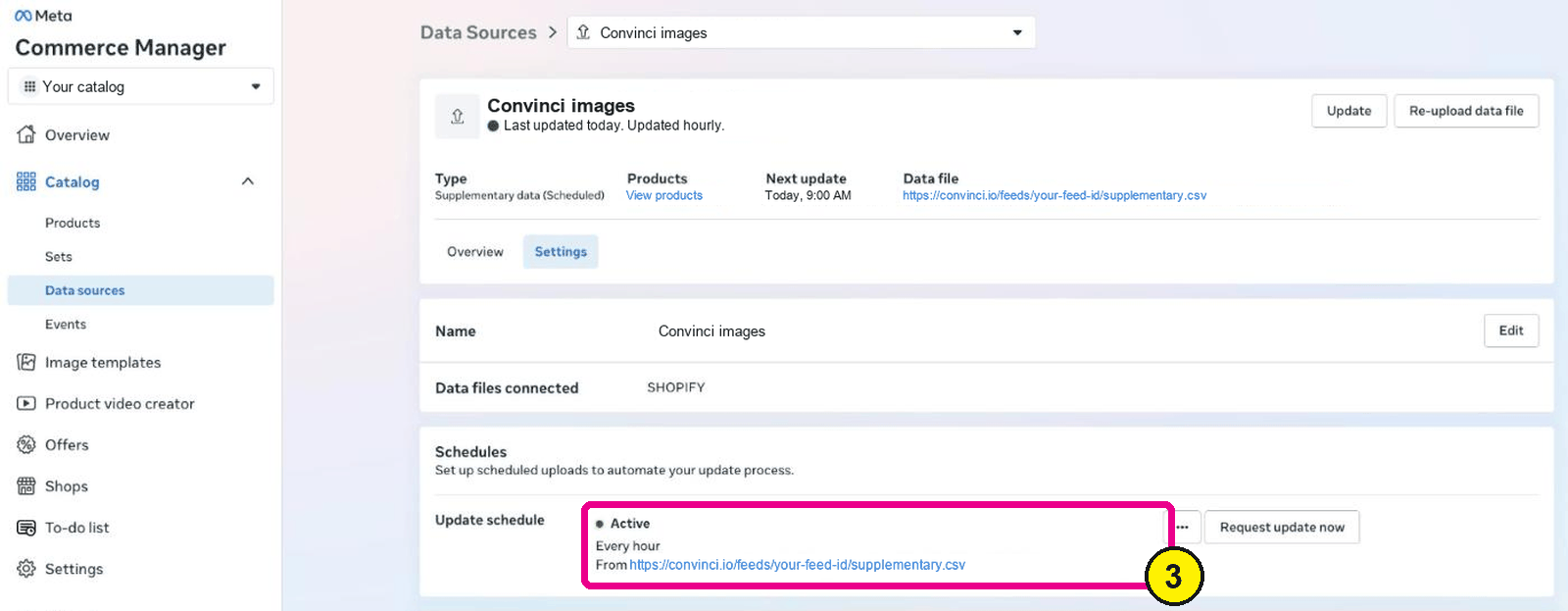
Commerce Manager, Data sources, your feed, Settings. Screens as of Oct 2026. - Check a few items in Commerce Manager after the next fetch to see the new images.
- Watch the "Last significant edit" column in Ads Manager for the next few days.

Do not change anything on the ad at the same time. If you do, you will not know what caused a change.
Convinci does steps 1 to 3 for you. New images usually show on the item in Commerce Manager within minutes of a fetch, and in live ads the same day. To see your own products with a design on them, try the free preview. Plans are on the pricing page.

How to check if an ad set is learning again
Meta's learning phase page gives you two places to look.
- The Delivery column reads "Learning" while an ad set is in the learning phase.
- The Last significant edit column shows when the last edit that restarts learning was made.
If the Delivery column says "Learning limited," the ad set is not getting enough results to finish learning.
How long learning takes
Meta's learning phase page says ad sets leave learning "as soon as they can deliver stably." It adds a rough guide.
"This usually occurs after about 50 results in the week after the ad set's last significant edit." We read it again on October 12, 2026.
During that time, Meta says "ad sets are less stable and usually have a higher CPA." Its advice is plain:
- "Wait to edit your ad set until it's out of the learning phase."
- "Avoid unnecessary edits."
- "Avoid high ad volumes."
- "Use realistic budgets."
That is why a catalog change that does not edit the ad is worth knowing about. For the whole picture, read what the Meta learning phase is and what restarts it. For more on feed changes, read product feed optimization for Meta.
How fast does a feed change reach your ads? Read how long until catalog changes show in ads.
Questions
- Does editing an ad reset the learning phase?
- Yes. Meta lists any change to ad creative as a significant edit. A new image, text, frame, overlay or template choice on the ad sends the ad set back into learning.
- Does changing catalog images reset the learning phase?
- Meta does not list catalog item updates as a significant edit. The images come from the catalog, so the ad is not edited. Meta also does not promise it has no effect.
- How long does the Meta learning phase take?
- Meta says it usually ends after about 50 results in the week after the last significant edit. If the ad set cannot get enough results, Delivery shows "Learning limited."
- Does a new catalog ad start in learning?
- Yes. Any new ad or ad set starts in learning. That includes a new ad you set up to use designed catalog images. Only changes to existing catalog items skip the ad edit.
- How do I see if my ad set is learning?
- Look at the Delivery column in Ads Manager. It reads "Learning" during the phase. The "Last significant edit" column shows when the last edit that restarted learning was made.
See these badges on your own products before you pay anything.
Try the free previewFree for 10 products. See pricing.