Catalog ads
How to schedule Black Friday creative for Meta catalog ads
Convinci team. Published 2026-10-12, updated 2026-10-12.

Black Friday is November 27, 2026. Your catalog ads should look like Black Friday that morning, and stop looking like it when the deal ends. You do not want to be up at midnight swapping files. Here are the ways to schedule it, and the trade off of each.
The short answer
There are two kinds of approach.
You can schedule a new ad. Build a Black Friday version of your catalog ad and set it to start on the day. It is simple, but a new ad starts in the learning phase. Meta's significant edits page lists "Adding a new ad to your ad set" as a significant edit.
Or you can schedule a catalog change. Your ads stay as they are. The pictures in your catalog change on the day, through a supplementary feed. You launch no new ad and edit nothing in Ads Manager.
Four ways to schedule it, side by side
| Way | Work | New ad or ad edit? | Switches back by itself? |
|---|---|---|---|
| New ad with a start and end date | Build one new ad | Yes, a new ad | Yes, with an end date |
| Edit the live ad on the day | Edit by hand, twice | Yes, an ad edit | No |
| Swap the feed file by hand | Make and upload images | No | No, you swap it back |
| Convinci scheduled look (Pro plan) | Pick a design and dates once | No | Yes |
Meta also has free catalog overlays and image templates set on the ad. They are useful, but switching them on for a sale is an ad edit. Read Meta's free catalog ad templates.
Steps to schedule Black Friday pictures with a feed
- Pick your dates. For example, Black Friday from November 27 to November 30.
- Make the Black Friday version of each product picture, with the deal on the image.
- Host each new picture at a new URL. Meta's product data spec says a replaced image needs a new URL.
- Prepare a supplementary feed with id and image_link for each product.
- A few hours before the start, add or switch the feed in Commerce Manager, and set the fetch to Hourly.
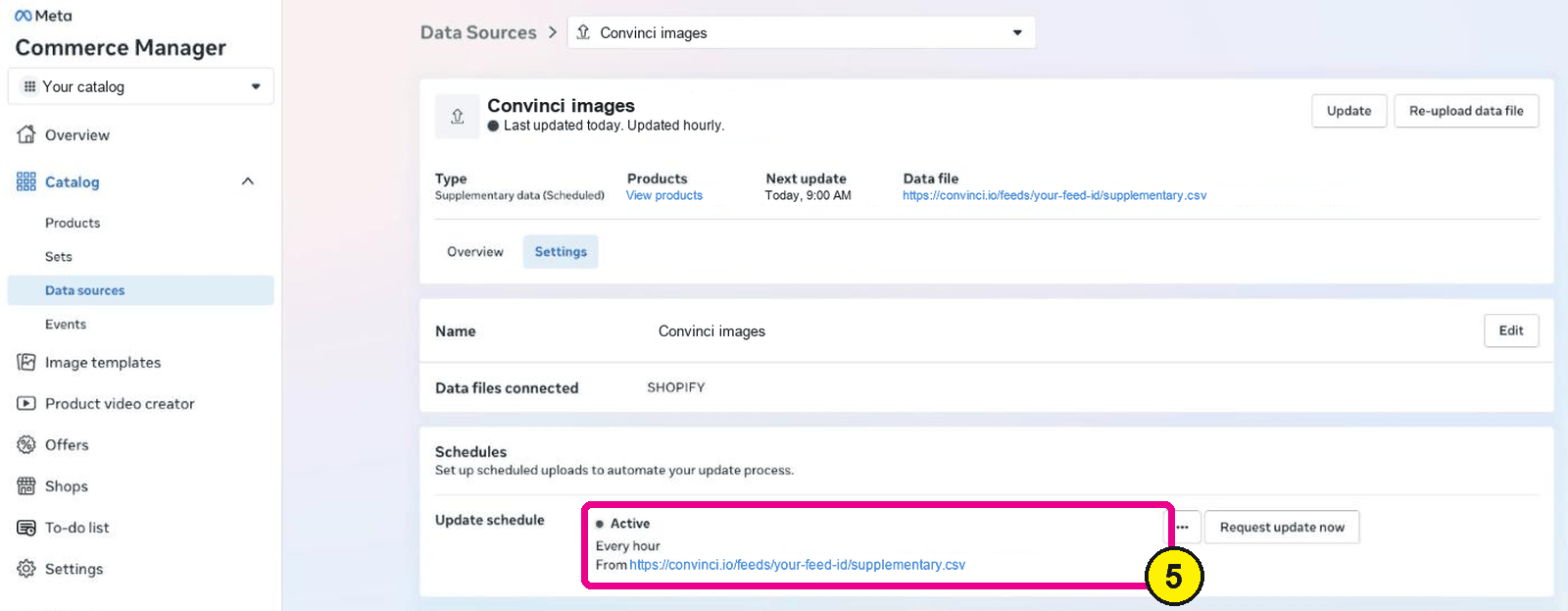
Commerce Manager, Data sources, your feed, Settings. Screens as of Oct 2026. - Check a few items in Commerce Manager after the first fetch.
- When the deal ends, switch the feed back to your everyday pictures.

Steps 5 and 7 are the ones people miss. They fall on a holiday weekend, at odd hours. That is why a scheduled switch helps.
How Convinci schedules it
Convinci does steps 2 to 7 for you. You make a look for each promo, like Black Friday, Boxing Day and New Year. You pick each one's start and end dates. Your catalog switches to the look on the start date and back to your everyday look after the end date. Your ads, ad sets and campaigns are not edited. Scheduling is on the Pro plan.
The percent off comes from your Shopify compare-at price, so only products that are really on sale show a badge. You write the badge words.

To see every promo's look on your own products, try the free preview.
Timing tips
- Switch a few hours early. Meta has to fetch the feed and then show the pictures.
- Keep the fetch on Hourly during promo week.
- Set true sale prices in Shopify before the switch, so badges and prices agree.
- Plan the end too. Pictures that still say Black Friday on December 2 look careless.
- Do not change the ad in the same week. If you must edit, do it well before the promo.
For the whole month by month plan, read Black Friday catalog ads. To understand the cost of a reset, read what the Meta learning phase is.
Questions
- Can a Meta ad start on Black Friday by itself?
- Yes. Set a start date and an end date on the ad set when you build it. The new ad starts in the learning phase when it launches, because Meta treats a new ad as a significant edit.
- Can I schedule catalog image changes in Meta?
- Meta fetches a scheduled feed hourly, daily or weekly. It does not switch pictures on a date for you. You switch the feed on the day, or use a tool that does it on a schedule.
- When should Black Friday pictures go live?
- A few hours before the deal starts. Meta must fetch the feed first. Keep the fetch on Hourly for promo week, and check a few items after the first fetch.
- How do I switch back after Black Friday?
- Point the feed back to your everyday pictures, or remove it. With Convinci on the Pro plan, each look ends on its end date and the catalog goes back by itself.
- Do I need a new ad for every promo?
- No. Catalog ads take their pictures from the catalog. Change the catalog pictures for each promo and keep the ads you already run.
See these badges on your own products before you pay anything.
Try the free previewFree for 10 products. See pricing.