Catalog ads
Catalog ads (DPA) not converting? A 9 step checklist
Convinci team. Published 2026-09-26, updated 2026-09-26.


Your catalog ads (also called dynamic product ads, or DPA) get clicks. People land on your store. Then nothing sells. That is one of the most common problems with catalog ads, and it is rarely one thing.
Work down this list in order. The early steps are about data. If the data is wrong, no design or budget fix will help. The later steps are about what the shopper sees.
The checklist, in order
- Check your pixel events. Open Events Manager and confirm ViewContent, AddToCart and Purchase fire on your store.
- Check that each event sends product IDs. The events need
content_idsorcontents, and the IDs must match your catalog. - Check your catalog match rate in Commerce Manager. Meta recommends 90% or higher.
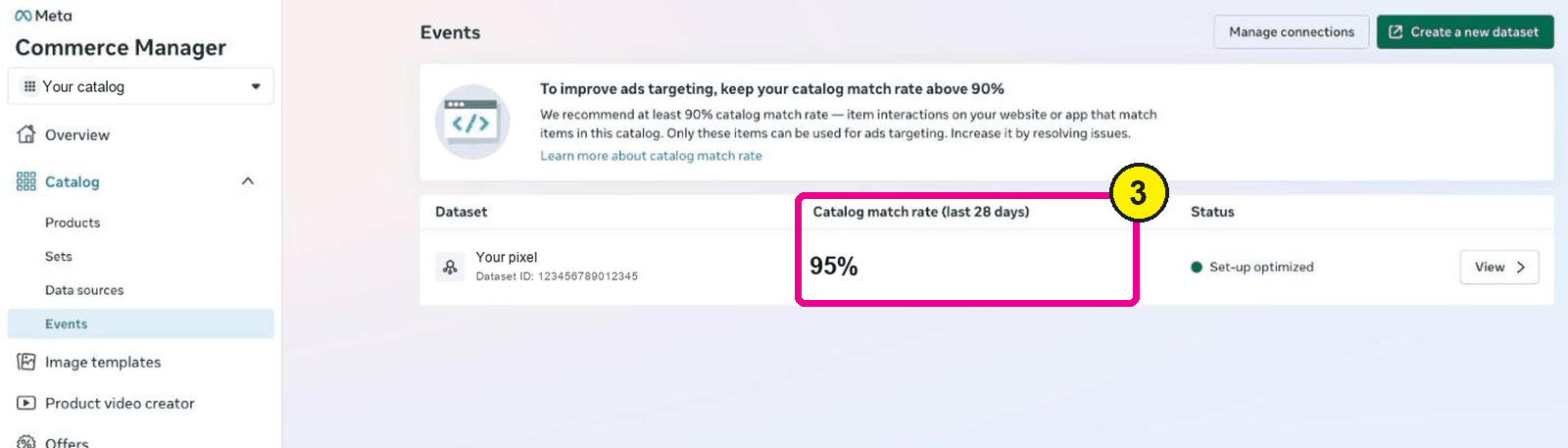
Commerce Manager, Catalog, Events. Screens as of Oct 2026. - Check for products with issues. Filter the Products tab by issues and fix what Meta flags.
- Check your product set. Make sure it holds the products you want to sell, and that it is not too small.
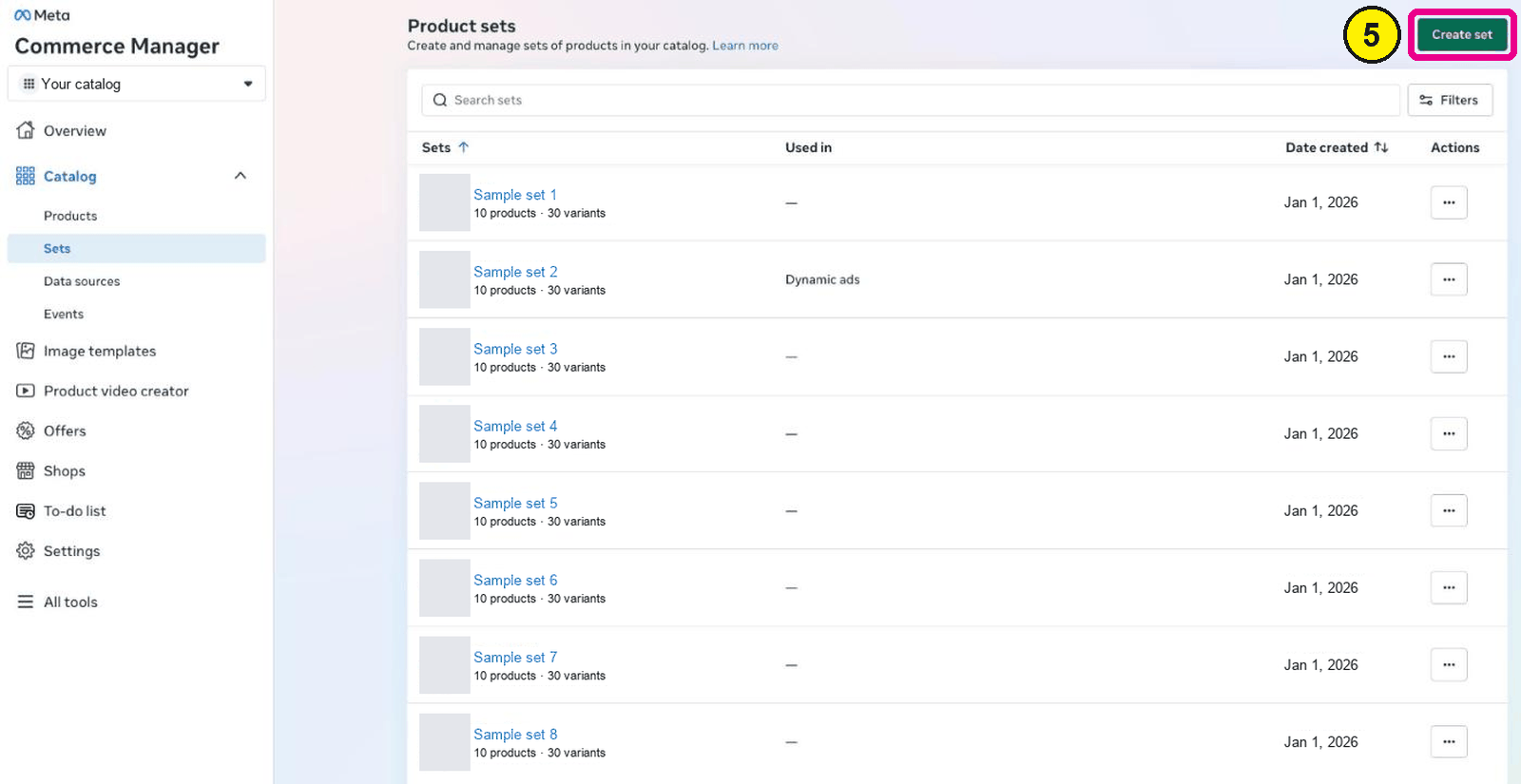
Commerce Manager, Catalog, Sets. - Check the audience. Retargeting and broad audiences need different settings and different ads.
- Check the landing page. Click the ad and confirm it opens the same product, price and variant.
- Check the price and offer. A catalog ad shows the price, so make sure it is right and fair.
- Check the image. Make sure it shows the product clearly and gives a reason to buy now.


Each step has more detail below. Do not skip ahead. Step 9 is the fun one, but steps 1 to 3 break more campaigns.
Steps 1 to 3: the pixel and match rate
Catalog ads pick products for each person from pixel events. Meta's required pixel events page lists three: ViewContent, AddToCart and Purchase. Each needs content_ids or contents.
If those IDs do not match your catalog, Meta cannot tie a visit to a product. Meta's match rate page recommends keeping the match rate above 75%, and ideally above 90%.
Meta's match rate troubleshooting page lists the common mistakes:
- The parameter is spelled
content_idinstead ofcontent_ids. - The IDs in the event are not in the catalog, or were deleted.
- Several IDs are sent as one string, like
'12345,67890'. - Two catalogs are connected to one pixel, which splits the match rate.
Match rate covers the last 28 days, with a 48 hour delay. So a fix today will not show for up to two days.
If you use Shopify's Facebook and Instagram app, the pixel and catalog usually match out of the box. It still pays to check. A second catalog or an old pixel can split your numbers.
Step 4: products with issues
A product with an issue will not show in ads. Meta's page on products not showing lists the common ones. Out of stock products do not appear in ads. Broken image links, images over 8 MB and images that are too small also stop a product.
Open Commerce Manager, go to Catalog, then Products. Click Filters and pick the issues under Advantage+ catalog ads. Fix them at the source. On Shopify, fix them in Shopify, not in Commerce Manager.
Steps 5 and 6: product set and audience
If your product set holds cheap add ons, the ads will sell cheap add ons, or nothing. Look at what is in the set. Read our guide to product sets for catalog ads for how to build them.
Next, check who sees the ads. People who viewed a product last week are a warm audience. People who never visited are cold. Meta gives different advice for each. Our page on retargeting vs prospecting covers both.
Steps 7 and 8: landing page and price
Click your own ad. It should open the exact product, in the right variant, at the price the ad shows. If it opens a home page, a sold out variant or a different price, shoppers leave.
Then look at the price with fresh eyes. A catalog ad puts the price right on the card. If the shipping cost at checkout is a surprise, the sale dies there. If you have a real sale, show it. If you do not, do not invent one.
Step 9: the image
Now look at the card itself. Most catalog ads use the plain store photo. It shows the product, but it says nothing about who sells it or why to buy today.
Here is a candle from the Northbank Supply sample store, as the plain catalog photo.

Here is the same candle with the star rating, the review count and a true sale price on the card.

The ratings and prices on these cards are sample data. The point is the layout. Proof and the offer sit around the product, not on top of it.
To change the image without editing the ad, use a supplementary feed. Meta lists any change to ad creative as a significant edit. A feed change does not edit the ad. Read does changing catalog images reset learning for the full answer.
You can see your own products as designed cards in the free preview. No account and no card needed.
What not to do
- Do not rebuild the campaign first. A new campaign starts in learning. Fix the data, then wait.
- Do not judge in two days. Give a change a week of data before you decide.
- Do not add a fake sale. It may lift clicks, but it hurts trust and can break Meta's rules.
- Do not stack two price tags. If your image shows a price, turn off Meta's dynamic overlays.
When the data is clean and the ads still do not sell, test the creative. Our pricing page shows what Convinci costs, from a free plan up.
Questions
- Why do my catalog ads get clicks but no sales?
- Most often the pixel events or product IDs are wrong, or the landing page does not match the ad. Check your match rate, then click your own ad and check the product, variant and price.
- What is a good catalog match rate?
- Meta recommends keeping it above 75%, and ideally 90% or higher. A low match rate limits which products Meta can show to people who visited your store.
- Do out of stock products show in catalog ads?
- No. Meta's help page says out of stock products do not appear in ads. They can still show in your shop on Facebook and Instagram for up to 56 days, marked as sold out.
- How long should I wait after a fix?
- Match rate shows the last 28 days with a 48 hour delay. For ad results, give a change about a week of data before you judge it.
- Will fixing my images reset the learning phase?
- Editing the ad is a change to ad creative, which Meta lists as a significant edit. Changing images through the catalog feed does not edit the ad. Meta does not promise it has no effect.
See these badges on your own products before you pay anything.
Try the free previewFree for 10 products. See pricing.

 Your store
 Your card