Catalog ads
Why are my catalog ads (DPA) not delivering?
Convinci team. Published 2026-09-26, updated 2026-09-26.

Your catalog ad (also called a dynamic product ad, or DPA) is on, but it spends nothing. Or it spent for a week and then stopped. In most cases, the ad has no valid products to show.
A catalog ad can only show products that pass Meta's checks. If the product set is empty, too small or full of products with issues, the ad has nothing to deliver. Start there.
The short answer
Open Ads Manager and read the Delivery column. If it says items are invalid or the product set is too small, the problem is in your catalog. Fix it in Commerce Manager, or in Shopify if your catalog syncs from there.
If the catalog is fine, look at the pixel, the audience and the budget next.
Check 1: the product set is big enough
Meta's page on empty or small product sets sets a floor. A set needs at least 2 unique, valid products for carousel ads. It needs at least 4 for collection ads. "If your product set falls below the minimum number of products, ads may be paused."
Two things make a set smaller than it looks:
- Variants. Only one variant of a product shows per ad. Ten shirts in eight colors of one style count as fewer products.
- Same images. If several products share one image, Meta counts them as one product.
Meta recommends a large product set to help prevent this. Our guide to product sets for catalog ads shows how to build one. For the minimums in more detail, read how many products do catalog ads need.
Check 2: products with issues
Products with issues do not show in ads. Meta's products not showing page lists the common ones:
- Out of stock. "Out of stock products aren't shown in your ads."
- Archived products.
- Image problems. A broken link, a file over 8 MB, an image that is too small, or a server that blocks Meta's crawler.
- Missing product data or a policy rejection.
In Commerce Manager, go to Catalog, then Products. Click Filters and pick the issues under Advantage+ catalog ads. Click a product to see what is wrong. If your catalog comes from Shopify, fix it in Shopify and wait for the next sync.
A sale can empty a set fast. If your set is "on sale items" and the sale ends, the set may hold nothing. Our page on out of stock products in catalog ads covers the stock side.
Check 3: the pixel and the audience
Retargeting ads need people who viewed or carted your products. If your pixel does not send product IDs that match your catalog, that audience stays small. Meta's match rate page recommends a catalog match rate above 75%, and ideally above 90%.
A very tight retargeting window on a small store can also leave too few people. Meta's retargeting best practices suggest a 30 or 90 day window to grow the audience.
Our catalog ads not converting checklist walks through the pixel checks step by step.
Check 4: the ad and the budget
If the catalog and audience look fine, look at the ad set. A very low budget or a tight cost goal can hold delivery back. Meta's ad delivery guide starts at the campaign, ad set or ad level, depending on your budget type.
Be careful with fixes here. Meta's significant edits page says a change to targeting, creative, bid strategy or a new ad sends the ad set back into learning. Fix the catalog first, since a product fix does not edit the ad.
What to do next
- Read the Delivery column in Ads Manager.
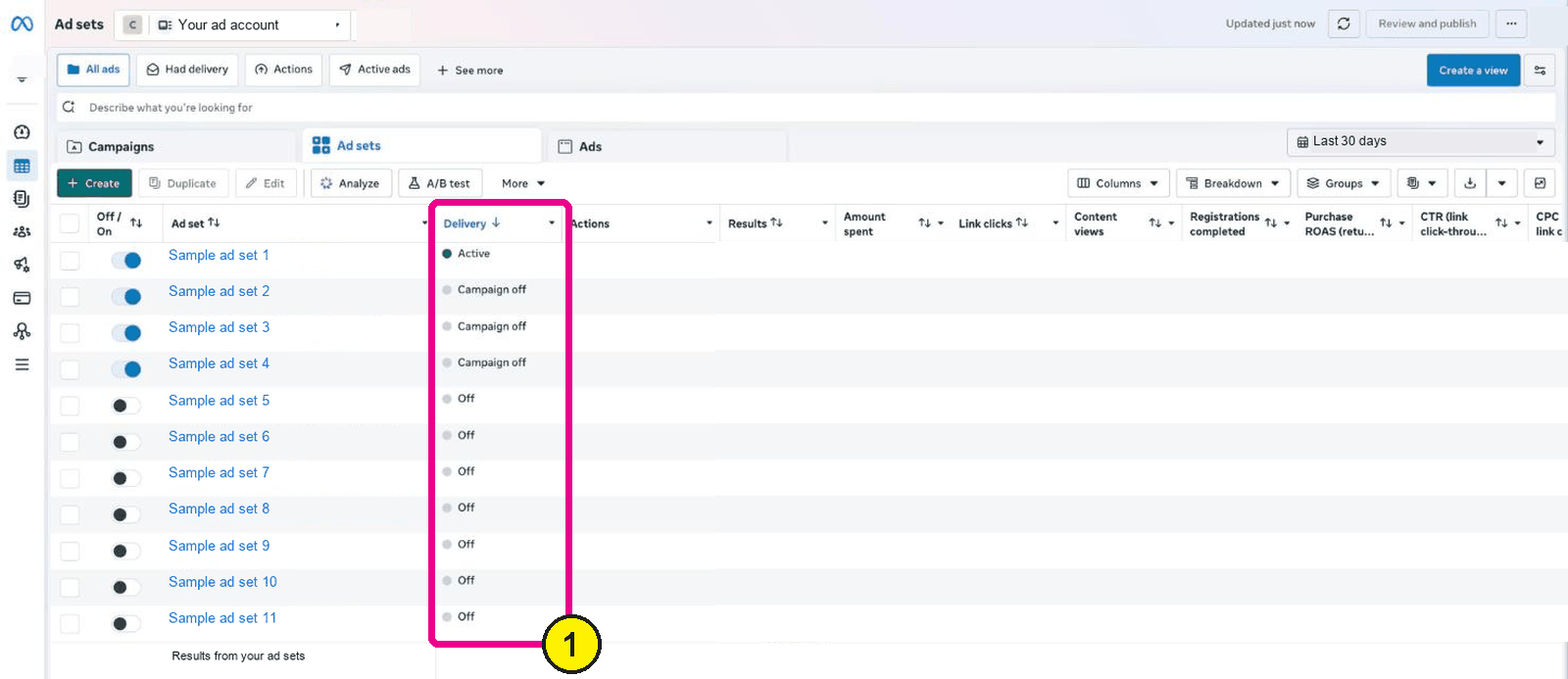
Ads Manager, Ad sets, Delivery column. Screens as of Oct 2026. - Open the product set in Commerce Manager and count the valid products.
- Filter products by issues and fix them at the source.
- Check your match rate in the Events tab.
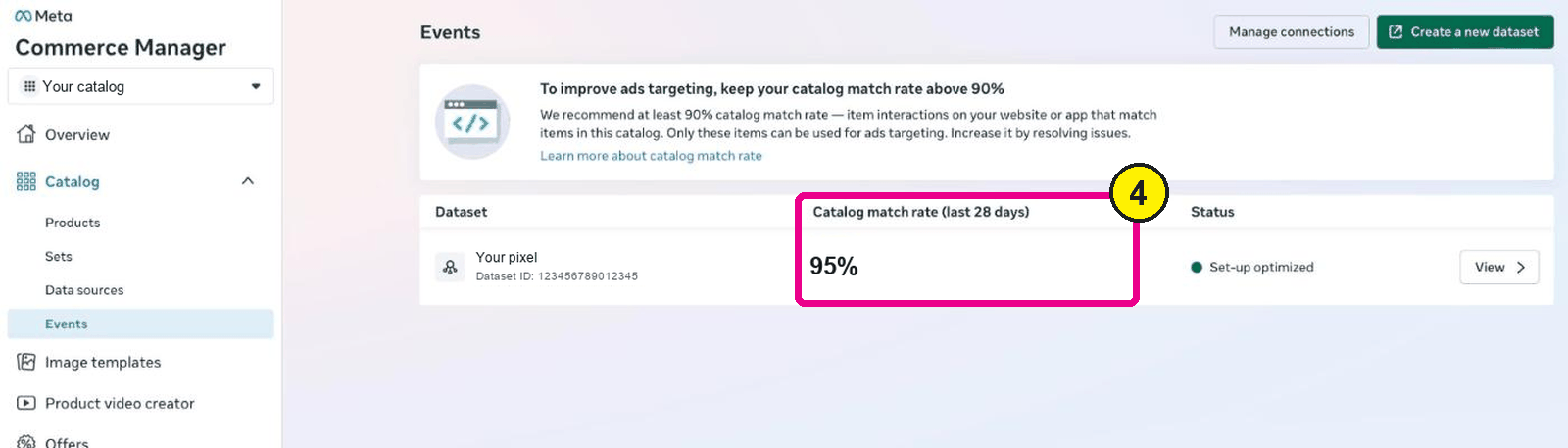
Commerce Manager, Catalog, Events. - Only then change the ad set.


Once the ads deliver, make them worth clicking. See how your products look as designed cards in the free preview. Plans are on the pricing section.

Questions
- Why is my catalog ad set spending nothing?
- Most often the product set has too few valid products. Products may be out of stock, archived or flagged with issues. Check the set in Commerce Manager and the Delivery column in Ads Manager.
- How many products does a catalog ad need?
- Meta says a product set needs at least 2 unique, valid products for carousel and at least 4 for collection. Below that, ads may be paused. Meta recommends a large set.
- Do out of stock products stop catalog ads?
- Out of stock products are not shown in ads. If every product in your set is out of stock, the ad has nothing to show. Keep your set broad so it always has stock.
- Does an image error stop delivery?
- It stops that product. Meta lists broken links, files over 8 MB and images that are too small as issues. If enough products fail, the set can fall below the minimum.
- Will fixing my catalog reset the learning phase?
- Fixing products in the catalog does not edit the ad. Meta lists edits to targeting, creative and bid strategy as significant. Meta also advises against editing a product set during a live campaign.
See these badges on your own products before you pay anything.
Try the free previewFree for 10 products. See pricing.

 Your store
 Your card